
HotelXray Blog
Stop Refreshing Marriott: Award & Rate Alerts That Show Every Check
Set a Marriott cash or award alert, see every check HotelXray runs, and get an email when your stay matches.
Last updated
The Marriott hotel you want has no award space, or the points price is above your budget. Set an alert in HotelXray and let it watch the dates. When a check finds a match, you get an email with the price and a booking link. You can open the check log whenever you want to see what it found along the way.
Marriott alerts sit in the same Chrome extension as Hyatt, Hilton and IHG alerts. If you already use HotelXray for another program, enable Marriott access in the panel and manage all your Award & rate alerts from one account.
Step 1: Open the Marriott alert form
Open HotelXray on marriott.com and grant Marriott site access if prompted. From a search result, click the bell labeled Set alert near the hotel name.
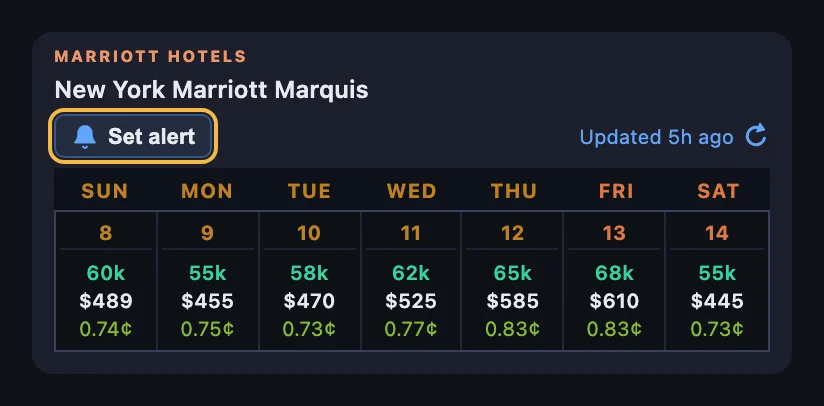
You can also select a day in the hotel’s calendar and click the bell in that day’s header. Set alert for this night starts with a one-night stay; change the dates in the form if you want a longer trip. Both bells open the same form.
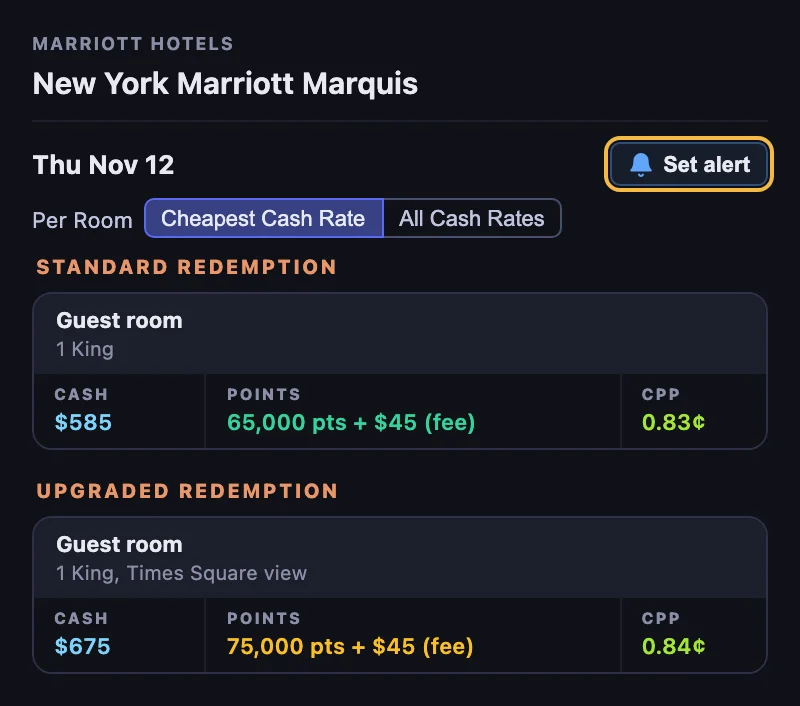
If you aren’t signed in, the form asks for your email address and sends you a code; enter it in the form and the alert is saved. HotelXray never asks for your Marriott Bonvoy credentials.
Step 2: Set up your alert
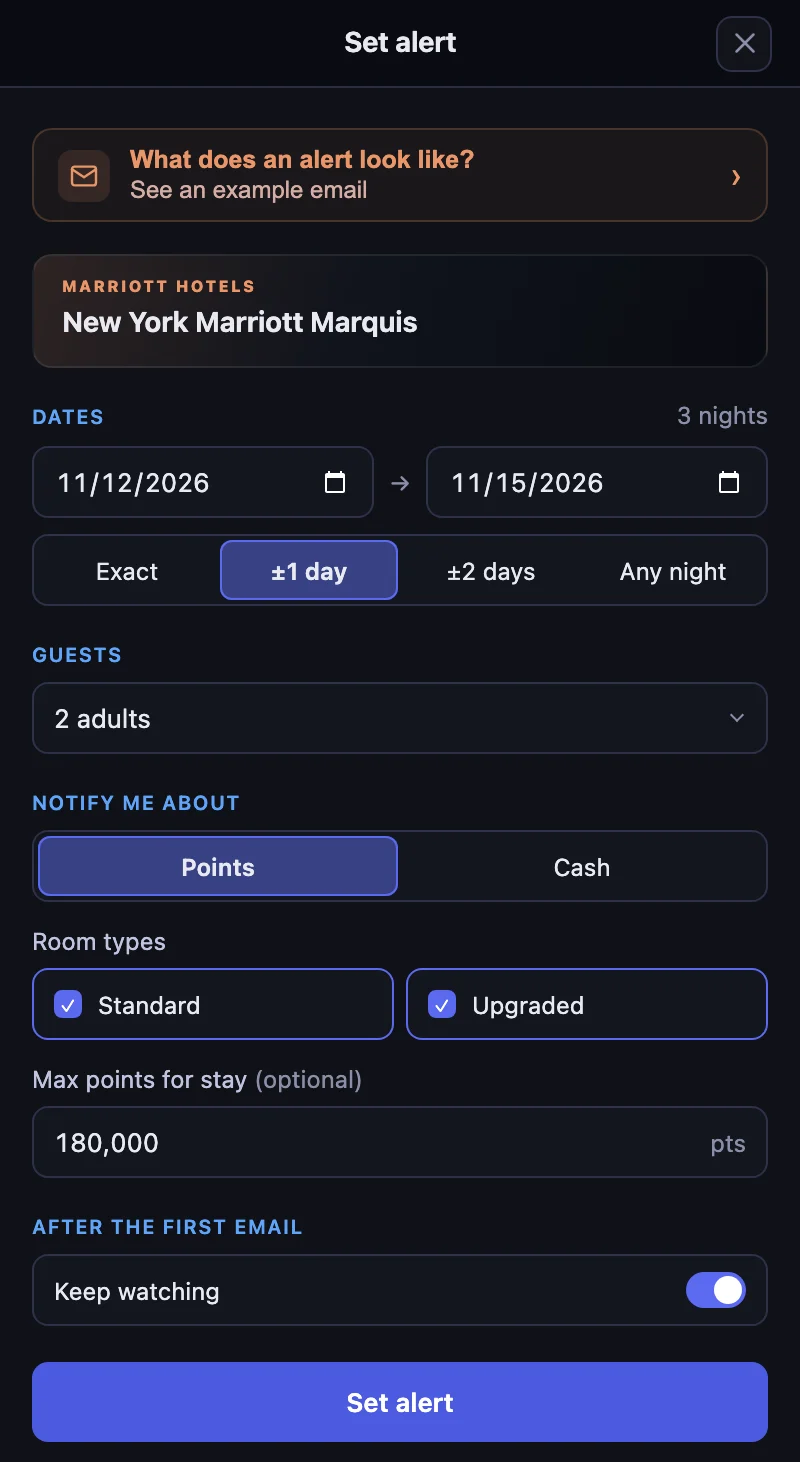
The prices and checks below follow a three-night alert for New York Marriott Marquis, November 12–15, 2026, with ±1 day of flexibility, watching both room types for 180,000 points or less for the stay.
Choose the dates
Pick check-in and check-out, then one of four choices. Exact watches only those dates. ±1 day and ±2 days also watch stays that start a day or two earlier or later, with the same number of nights. With ±1 day, the example watches November 11–14, November 12–15 and November 13–16.
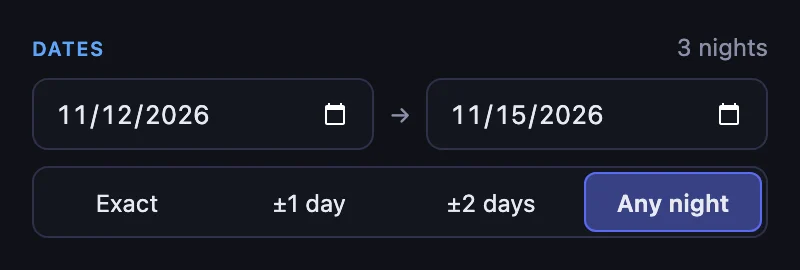
Any night watches every single night between the two dates, up to 7 nights. Use it when one night at the hotel would do and the date can move. A stay can be up to 30 nights.
Set the guests
Under Guests, set the adults and any children with their ages, and HotelXray checks prices for the people actually traveling. See rates for your guest count for why that changes the price.
Choose what to watch
Under Notify me about, choose Points or Cash. Each alert watches one of them.
Points watches for a stay paid entirely with points, in the room types you check:
| Option | What it watches |
|---|---|
| Standard | A standard room redemption |
| Upgraded | An upgraded room, such as a better view or a larger room, offered for more points |
Max points for stay is optional. It is one budget for every type you check: with both checked, whichever room comes in at or under it can match. This example sets 180,000 points for the three nights. On Any night the limit is per night.
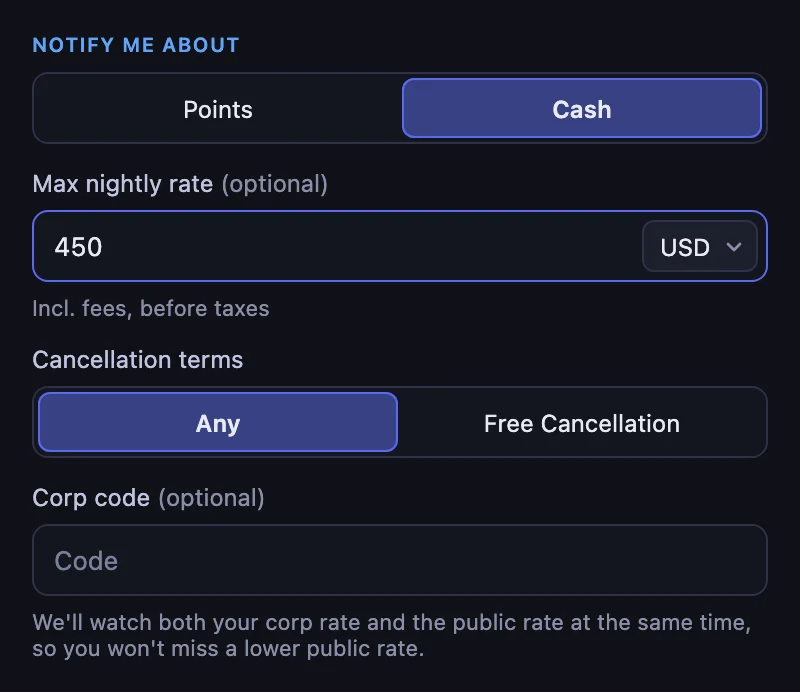
Cash watches for a room bookable with cash, or for a nightly rate under the Max nightly rate you set. The limit is an average per night, with fees included and before taxes, in the currency you choose.
A cash alert can also watch only rates you can cancel for free, or your company’s corporate rate alongside the public one. To watch the points price and the cash rate for the same stay, set two alerts.
After the first email
With Keep watching off, the alert emails you once and stops. This example switches it on, so HotelXray keeps emailing when a qualifying result changes, such as a lower price or award space coming back. Checks that find the same result stay in the log without another email.
Select Set alert to save. HotelXray sends a confirmation email when you create or change an alert.
Step 3: Read the check log
Close the Marriott tab if you like. HotelXray keeps checking the dates in the background and emails you when a check finds a match.
Every alert keeps an Alert check log, in the side panel and on your Award & rate alerts page. It records when checks ran, what they found, and which conditions passed.
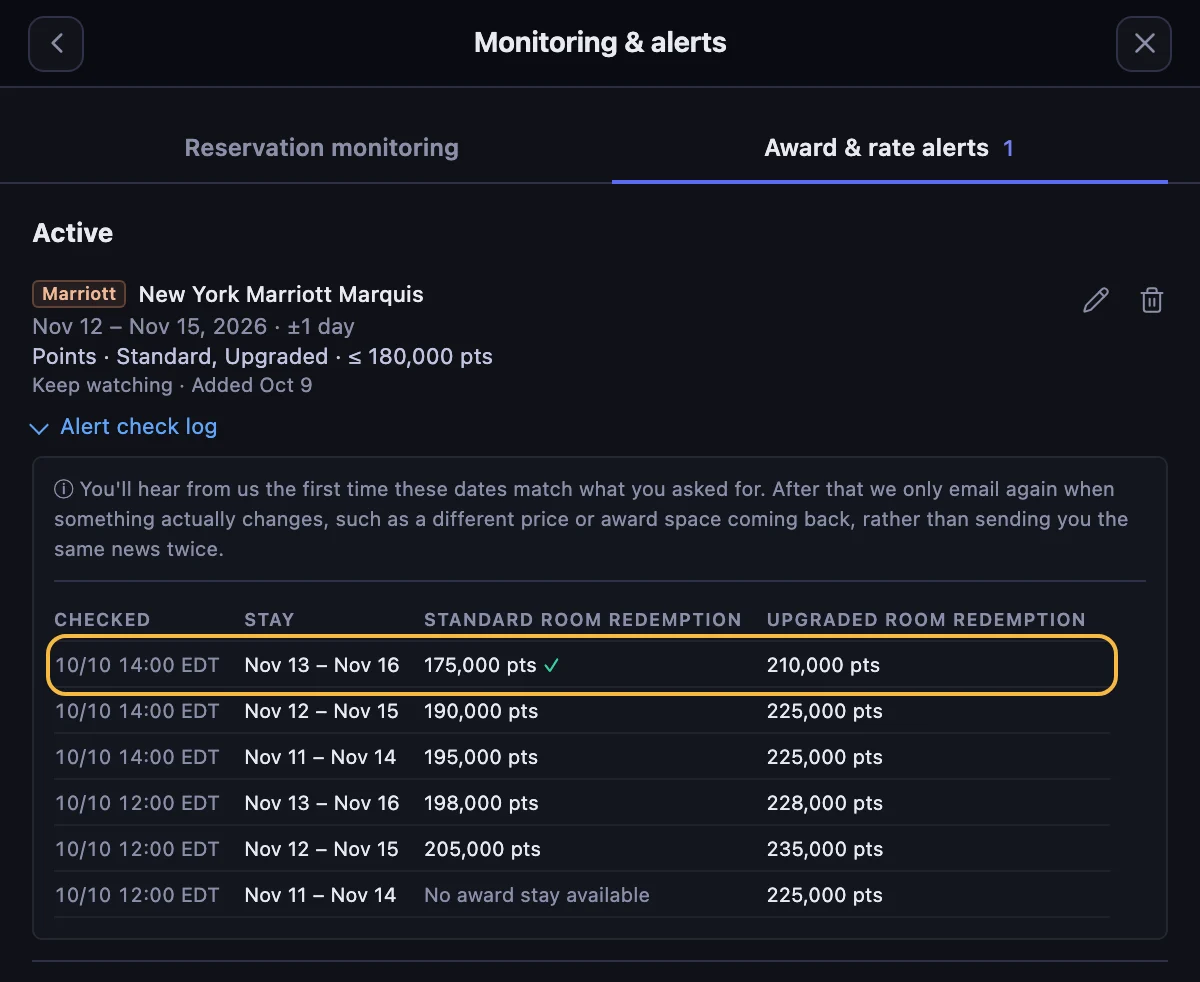
The columns follow what you watch. This alert has a Stay column for the flexible dates, then Standard room redemption and Upgraded room redemption. Each points figure is the total for the three nights.
At noon every stay was over 180,000 points, and one had no standard award at all, recorded as No award stay available. At 2 pm, November 13–16 shows 175,000 pts for the standard room with a green check. The upgraded room on the same stay is 210,000 points, over the budget, so it gets no check.
Step 4: Act on the match email
The email’s subject names the stay that matched. In this flexible example, that is Nov 13 – Nov 16, 2026, one day later than the original dates. The card below it repeats the dates you watched.
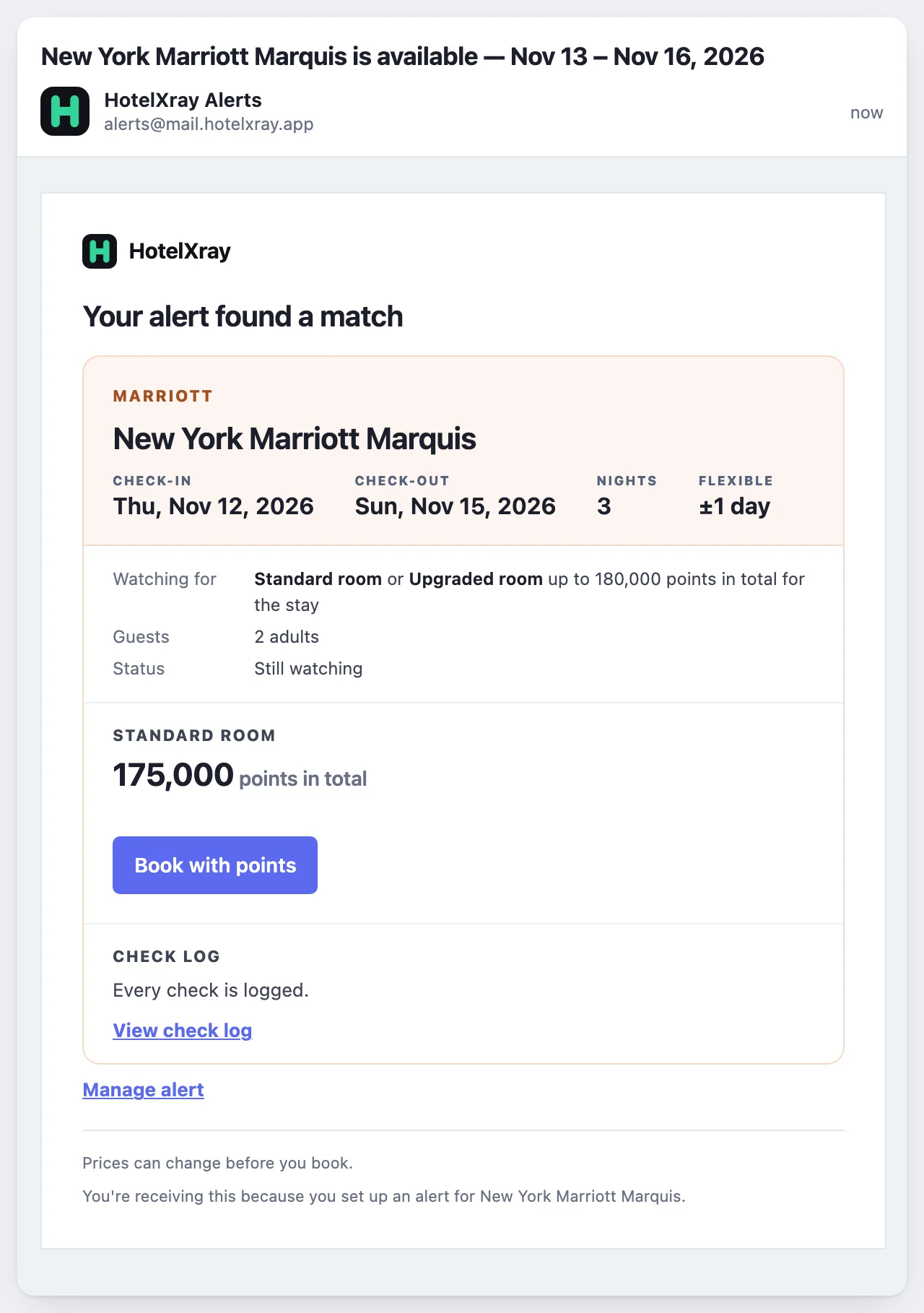
The email shows the room type and the points for the whole stay, and says the alert is still watching because Keep watching is on. Book with points opens the stay on marriott.com.
After a match
An alert without Keep watching moves to Notified and stops checking. With Keep watching on, as in this example, it stays Active, useful when you’ve booked a refundable rate and want to catch another drop. An alert moves to Dates passed when none of its candidate dates can be booked anymore; a flexible alert keeps going past its original start date while a later candidate remains.
Review, edit, or delete alerts in the side panel or on your Award & rate alerts page. Each alert watches one room at one hotel, for the party you set under Guests. Set separate alerts to compare your shortlist over the same dates.
Already booked? Reservation monitoring watches a booking you’ve made and emails you if it gets cheaper.
For Marriott calendars, room comparisons, and the rest of the update, read HotelXray: Compare Marriott Rates, Awards and Upgrades at a Glance.
See more when you search Hyatt, Marriott, Hilton or IHG
Compare cash and points across the month, check lounge details, and create rate or award alerts.
Add HotelXray to Chrome