
HotelXray Blog
Hotel Price Drop After Booking? Monitor Your Reservation and Rebook
HotelXray watches your Hyatt, Marriott, Hilton or IHG booking's exact room and rate, and emails you when the same stay gets cheaper so you can rebook.
Hotel prices keep moving after you book. If your rate can be cancelled for free, a lower price for the same room is money you can get back: book the stay again at the new price and cancel the old one. The hard part is noticing. HotelXray’s reservation monitoring does that for you. Open your booking on hyatt.com, marriott.com, hilton.com or ihg.com, start monitoring, and HotelXray checks your exact room and rate until free cancellation ends or you check in. When the same stay costs less, you get an email.
It works the same way on all four chains, and it never touches the booking itself. HotelXray doesn’t change or cancel it, and it never needs your hotel account password.
What reservation monitoring watches for
Monitoring compares like with like: the same hotel, dates, guests, room and rate you booked, total with taxes, against the price you paid. A different rate plan, such as a non-refundable rate or a package, never counts as a drop, so every email is about a stay you could actually swap in.
It keeps checking until your free cancellation ends, because after that a lower price no longer helps, or until check-in for a booking without a free-cancellation deadline.
Your real cancellation deadline, in your own time
Free cancellation deadlines are set in the hotel’s local time, and overseas bookings are where that catches people out. “Free until Dec 13, 11:59 PM” at a hotel in Tokyo ends at 6:59 AM on December 13 in California, not that night. Read it on your own clock and you lose almost a whole day, and with it the chance to cancel for free.
HotelXray reads the deadline in the hotel’s own time zone and, when your clock is different, shows the same moment in your time right under it. Monitoring runs right up to that real deadline, and the non-refundable check counts back from it too, so the deadline HotelXray works to is the one that decides whether you can still cancel for free.
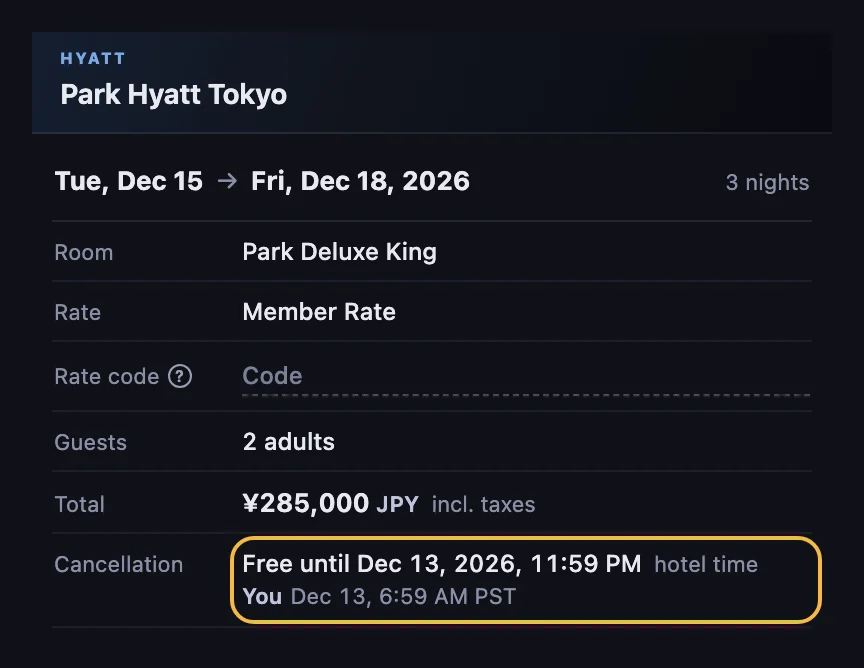
Start monitoring a booking
- Open your booking on the chain’s website with the HotelXray side panel open. The confirmation page right after booking works, and so does the booking’s page in your list of stays.
- The first time, select Allow so HotelXray can read your bookings.
- Check the details HotelXray filled in and select Start monitoring.
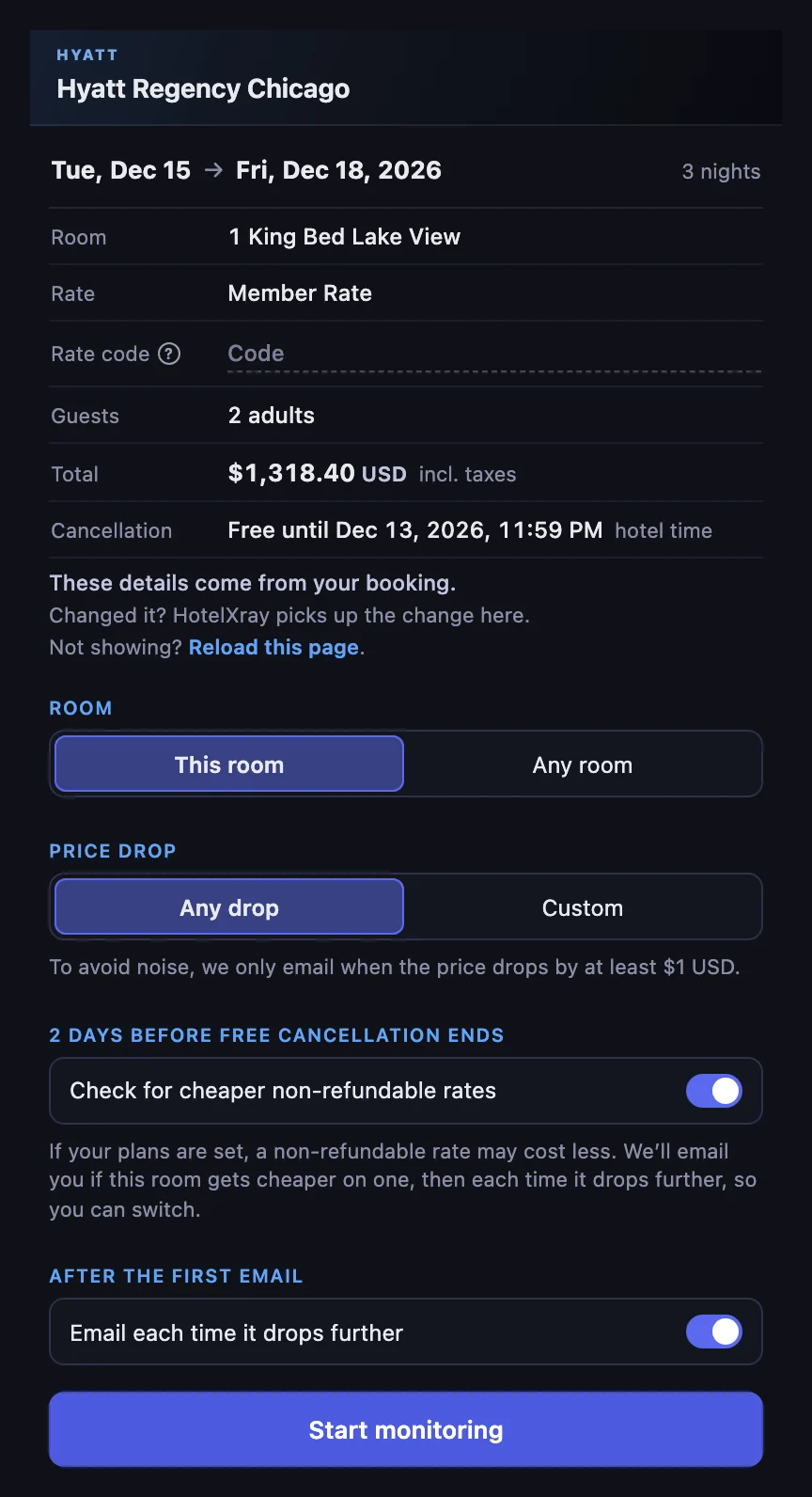
You can watch the room you booked or any room at the hotel on the same rate, and hear about any drop or only one worth the effort of rebooking, as a percentage or an amount. If you’re not signed in to HotelXray yet, your email address and a one-time code are all it takes.
The price drop email, and how to rebook
When a check finds your stay for less, HotelXray emails you with the price you booked, the price now, what you’d save, and your free-cancellation deadline. A button opens the same stay on the chain’s website.
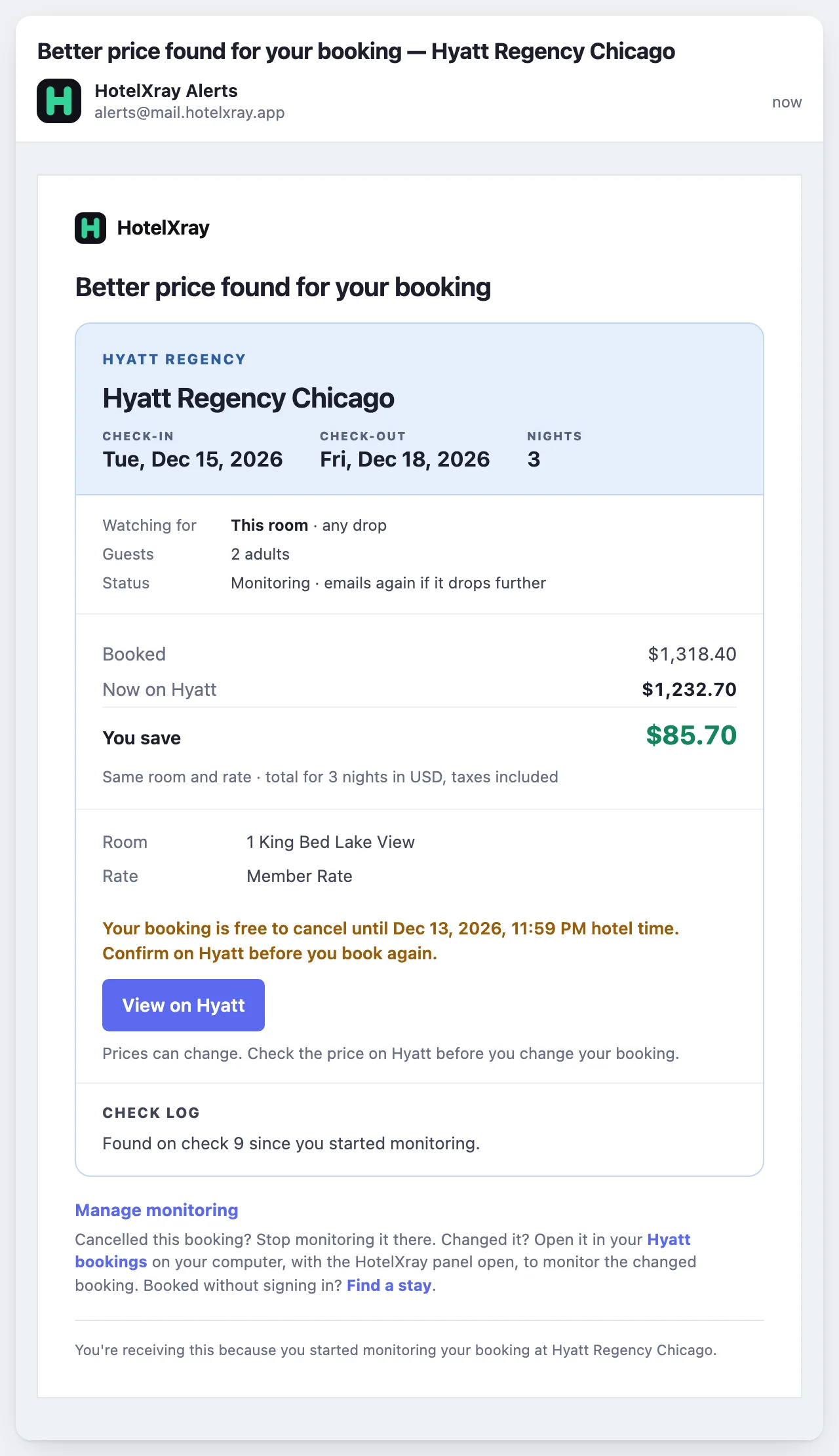
Before you rebook, open your existing reservation on the chain’s site and confirm it’s still refundable: free to cancel, with no fee, and a deadline that hasn’t passed. If it isn’t, a cheaper new booking doesn’t help, because you’d pay for both.
Then book the stay at the new price. Once the new reservation is confirmed, cancel the original one while it’s still free to cancel. Doing it in that order means you’re never without a room if the lower price disappears halfway through.
A price that drops once can drop again. With Email each time it drops further on, monitoring keeps going after the first email and tells you about each new low.
A cheaper non-refundable rate before free cancellation ends
By the last days of free cancellation, you often know your plans won’t change, and flexibility stops being worth paying for. With Check for cheaper non-refundable rates on, HotelXray looks at the same room’s non-refundable rates in the 2 days before your free cancellation ends, and emails you if one costs less than your booking.
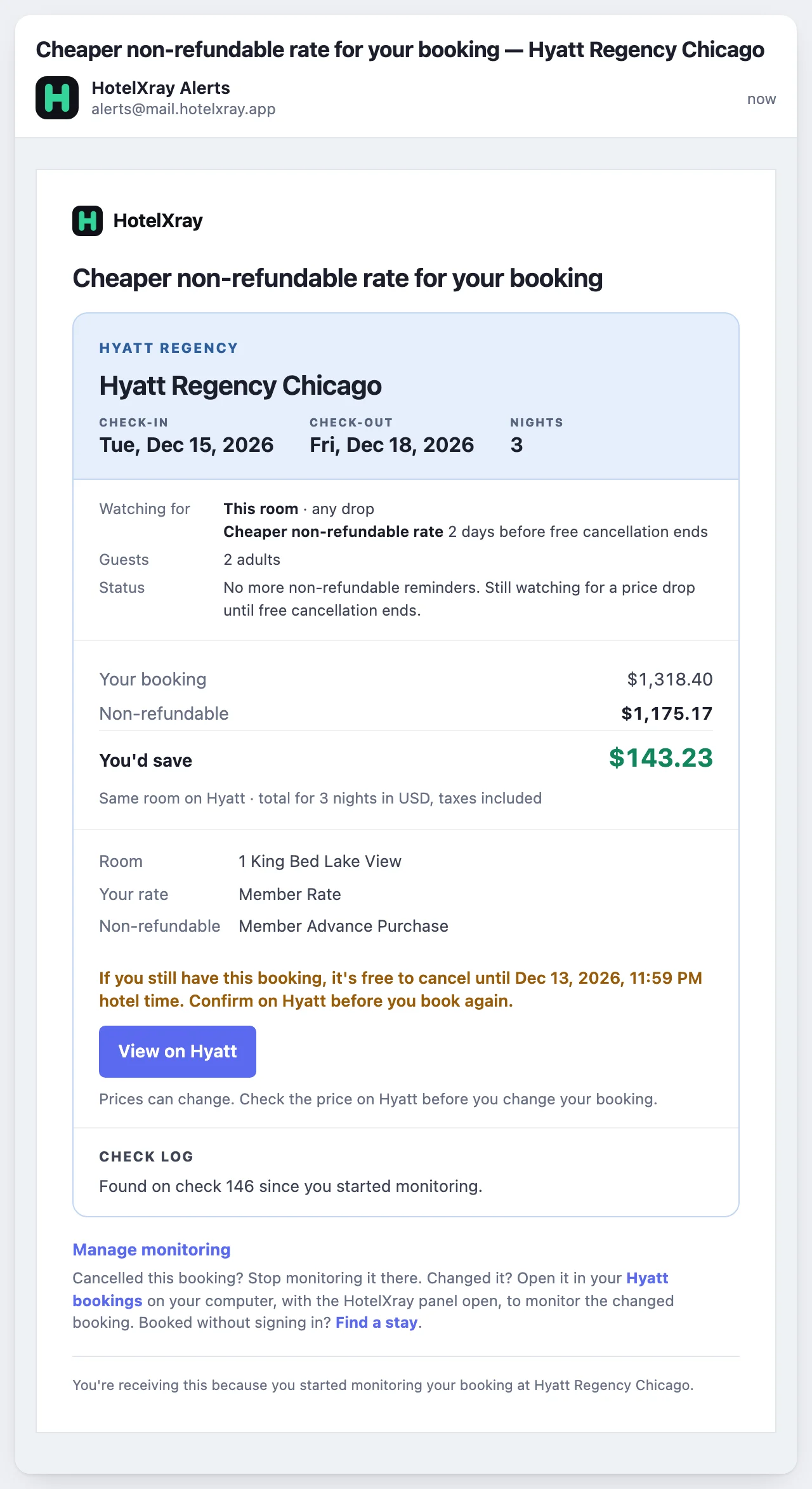
Switching gives up the right to cancel, so it’s your call. Still deciding what to book? The free cancellation rates guide shows the cheapest refundable rate on every night.
All your bookings in one place
Every monitored booking on all four chains is listed under Monitoring & alerts, in the side panel and on hotelxray.app, next to your award & rate alerts. Each one shows what you booked, what HotelXray is watching for, and a timeline to the end of free cancellation and check-in.
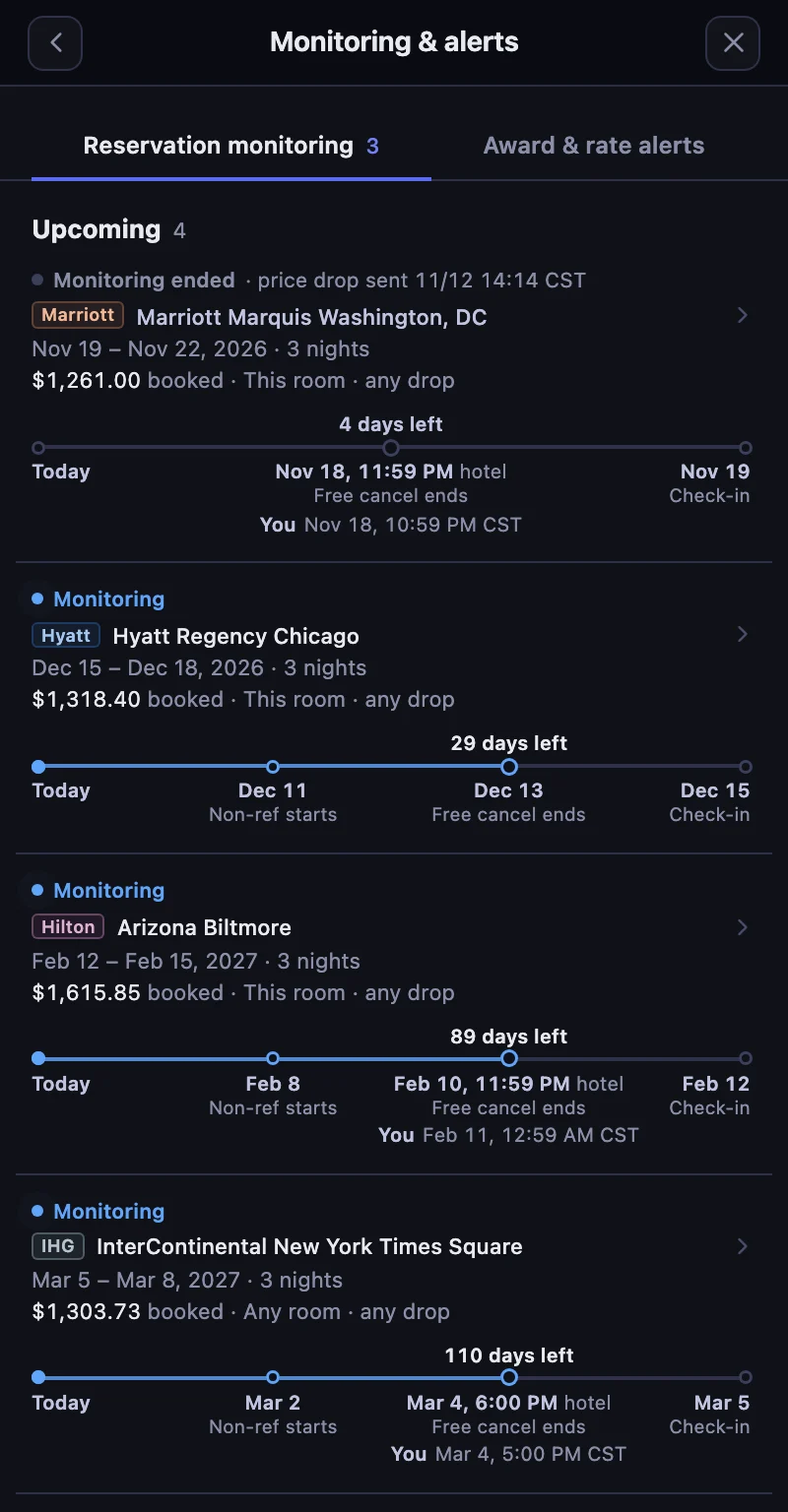
Change or cancel a booking and HotelXray picks it up the next time you open the booking’s page, offering to update monitoring or stop it.
What HotelXray reads, and what it doesn’t
Reading bookings is off until you select Allow. After that, HotelXray reads the hotel, dates, room, rate, guests, price or points, cancellation terms and confirmation number on your booking page. It never reads your name, contact details, loyalty number or payment card.
Before you book
To find the right stay in the first place, HotelXray compares points and cash across a whole month on all four chains, as the overview of Hyatt, Marriott, Hilton and IHG shows, priced for your guest count and your company’s corporate rate. If the award or rate you want isn’t there yet, an award & rate alert watches the dates for you: see the guides for Hyatt, Marriott, Hilton and IHG.
See more when you search Hyatt, Marriott, Hilton or IHG
Compare cash and points across the month, check lounge details, and create rate or award alerts.
Add HotelXray to Chrome