
HotelXray Blog
Catch a Hilton Standard Room Reward: Alerts That Show Every Check
Set a Hilton alert for a Standard Room Reward or cash rate, see every check HotelXray runs, and get an email the moment a Maldives award night appears.
Last updated
The Hilton resort you want shows only Premium Room Rewards at half a million points a night, and the cash rate is far above your budget. Set an alert in HotelXray and let it watch the dates. When a check finds a Standard Room Reward or a cash rate within your limit, you get an email with a booking link. You can open the check log whenever you want to see what it found along the way.
Hilton alerts join Hyatt and Marriott alerts in the same Chrome extension. If you already use HotelXray for either, enable Hilton access in the panel to watch all three programs from one account.
Step 1: Open the Hilton alert form
Open HotelXray on hilton.com and grant Hilton site access if prompted. From a search result, click the bell labeled Set alert near the hotel name. Its tooltip reads Set alert for this hotel.
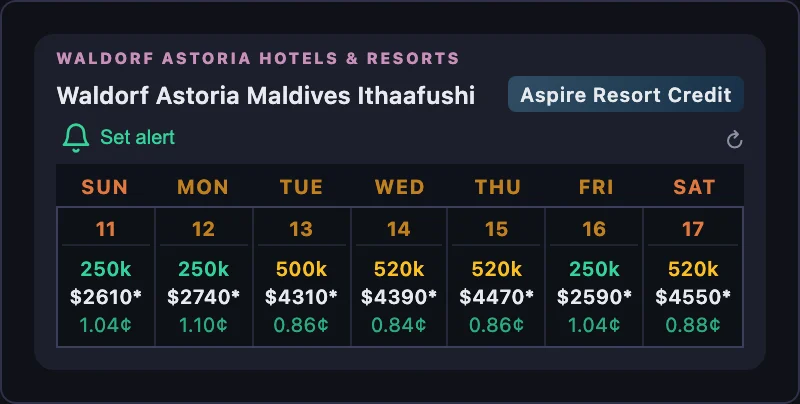
You can also open a day in the hotel’s calendar and click the bell in that day’s header. Set alert for this night starts with a one-night stay; change the dates in the form if you want a longer trip. Both entry points open the same form.
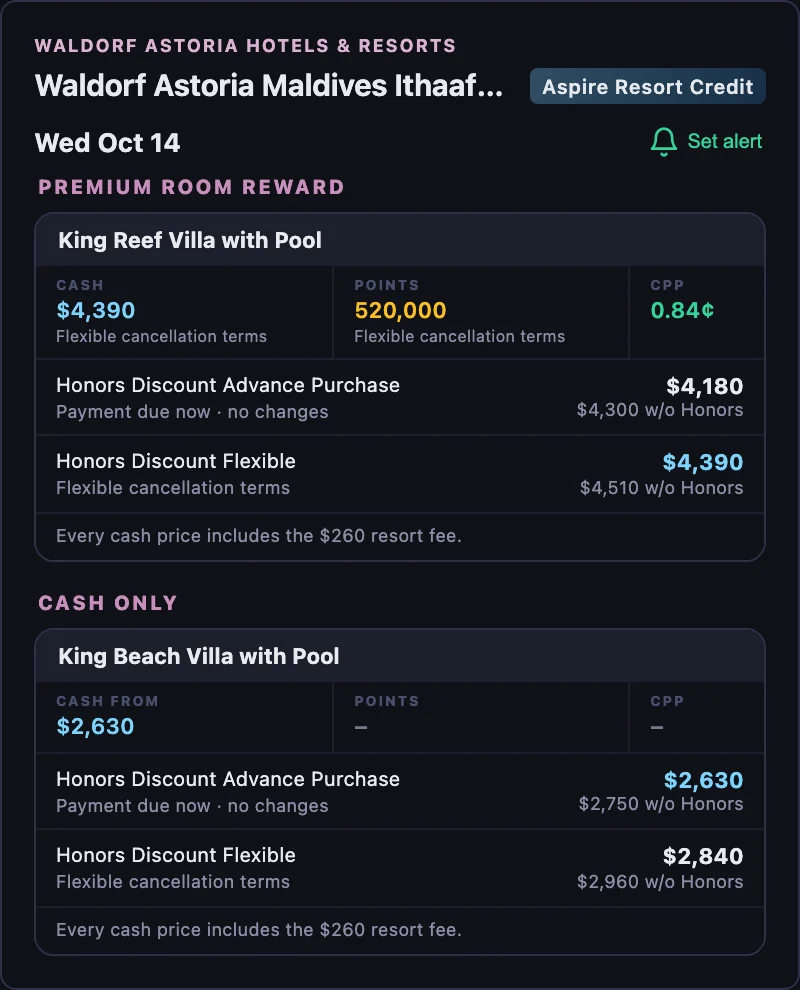
If you’re looking for a stay to use your Hilton Honors American Express Aspire Card’s resort credit, watch for the Aspire Resort Credit badge beside the hotel name. It marks participating resorts in search results and on the hotel page. Choose a badged resort, then set a cash limit and flexible dates to watch for a stay within your budget. Check that the rate and charges you plan to pay meet the card’s resort-credit terms before booking.
Sign in with your email address to save alerts and receive matches. HotelXray never asks for your Hilton Honors credentials.
Step 2: Configure your alert
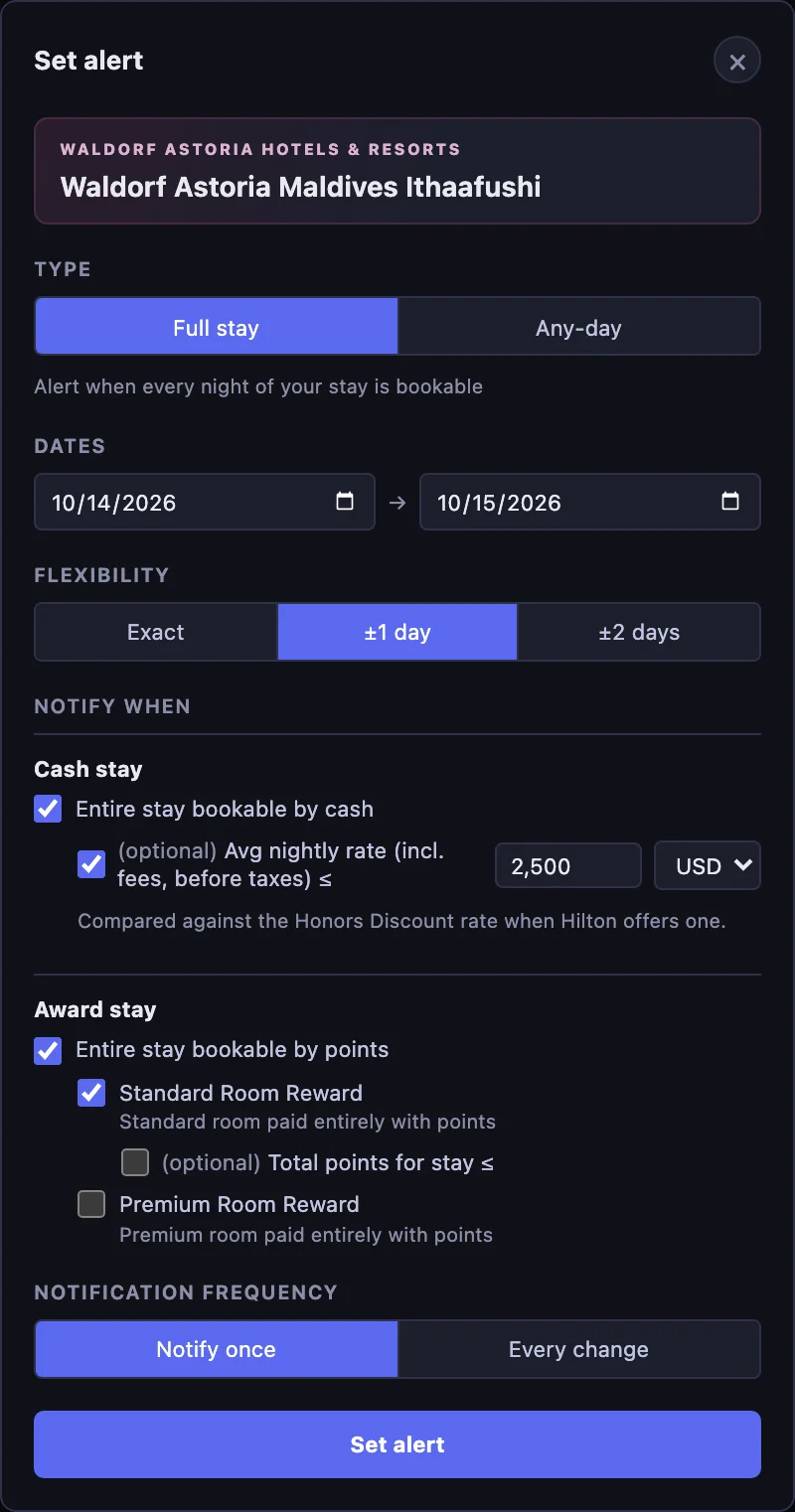
The sample prices and check history below follow a one-night alert for Waldorf Astoria Maldives Ithaafushi, October 14–15, 2026, with ±1 day of flexibility and Notify once.
Why alert on a standard award
At this property the Standard Room Reward is 250,000 points a night, and it sells out first. On many nights Hilton then offers only a Premium Room Reward, a different villa priced per room and per night, which in the example runs to 500,000 points and more. The calendar above shows the pattern: three nights of the week carry the standard award, four carry only premium.
A standard award can reappear when another guest cancels or when the hotel releases inventory. An alert is the practical way to notice.
Choose the stay and flexibility
Full stay watches for every night of your trip being bookable together. The date range can be up to 30 days. With ±1 day selected, our one-night example watches October 13–14, October 14–15, and October 15–16. Choosing ±2 days adds another possible start date on each side, keeping the stay length unchanged.
Any-day watches individual nights within a range of up to seven nights. Use it when one night at the property would work and the date is negotiable. Any-day always uses exact dates because the range already provides the flexibility.
Set the cash and award conditions
Under Cash stay, select Entire stay bookable by cash. Leave the optional limit unchecked to watch availability at any price, or set a maximum average nightly rate. Our example uses $2,500 USD per night, including fees and before taxes. HotelXray compares the limit against the Honors Discount rate when Hilton offers one, which is the price you see as a signed-in member.
Under Award stay, select Entire stay bookable by points, then choose the Room Reward types you would accept:
| Option | What it watches | In this example |
|---|---|---|
| Standard Room Reward | A standard room paid entirely with points | Checked, no points limit |
| Premium Room Reward | A premium room paid entirely with points | Not selected |
A Premium Room Reward is a different room at a higher points price, not an upgrade on the standard award, so it has its own checkbox and its own optional points limit. Hilton has no Points + Cash option, so there is nothing else to configure.
Leave the Standard Room Reward points limit unchecked here. If you plan to pay with a Free Night Reward, the points price does not matter; only the award’s existence does. If you plan to pay with points, tick the limit and enter the most you would spend for the stay.
The enabled cash and award options are alternatives. Any one of them can trigger a match. A bookable villa at $2,840 per night does not qualify on cash with the $2,500 limit, but a Standard Room Reward on the same night still matches on its own.
Watch the units: cash-rate targets are average per night; points are totals for the stay, as Hilton quotes them before member benefits. The cash limit includes fees and excludes taxes.
Choose how long to keep watching
Notify once stops after the first match. Every change keeps watching and emails you when a qualifying result changes, such as a different price or award space returning. Repeated checks with the same result stay in the log.
Choose Notify once for this example, since one standard award night is the goal, then save the alert. HotelXray sends a confirmation when you create or change an alert.
Step 3: Read the check log
Save the alert and close the Hilton tab. HotelXray checks the dates in the background and emails you when a check finds a match.
Open Alert check log from your alert in the panel or your account’s Alerts page. It records when checks ran, the values observed, and which conditions passed.
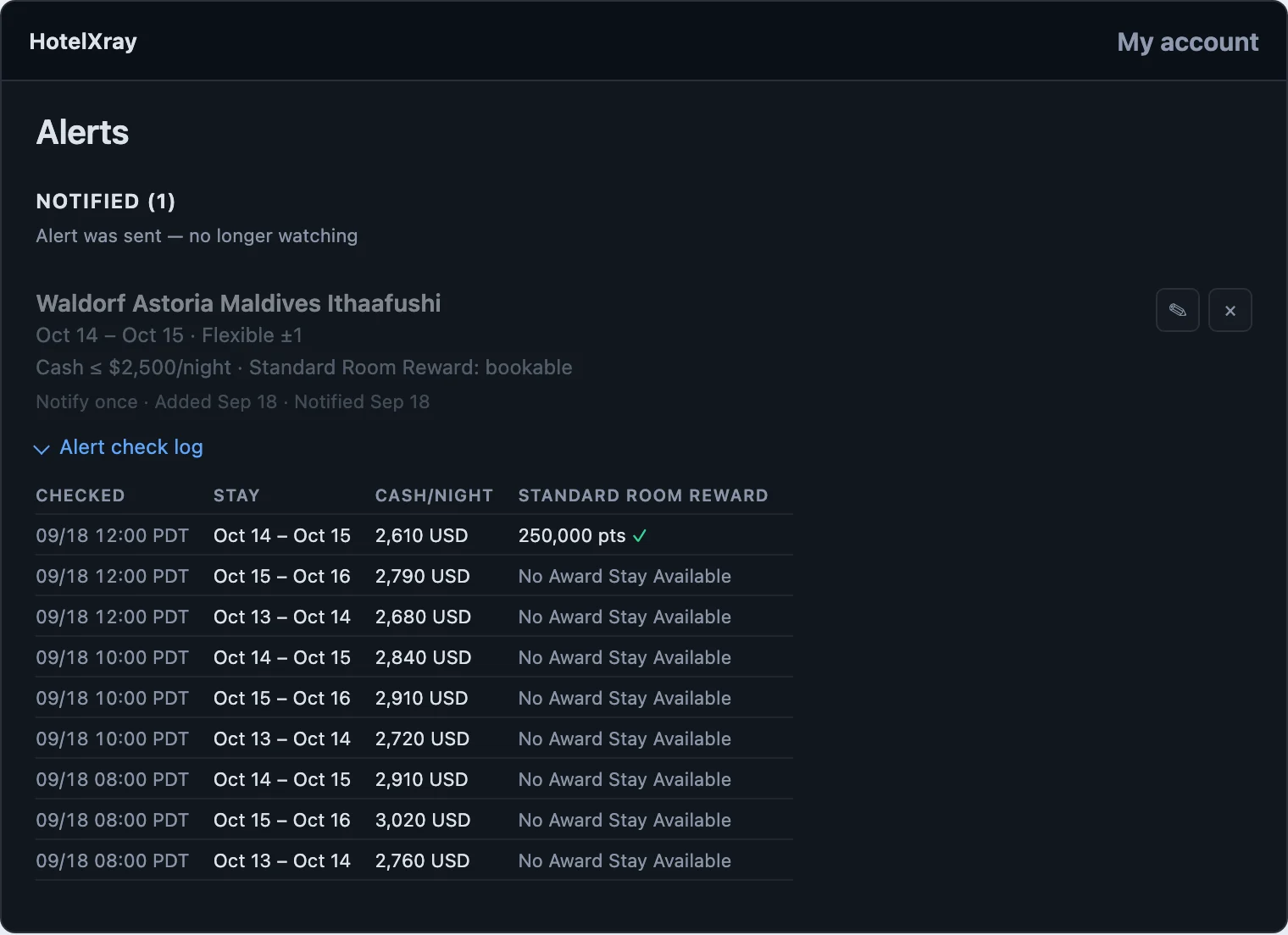
The columns follow your selected options. This alert shows Stay, Cash/Night, and Standard Room Reward. Premium Room Reward is not enabled, so it has no column. Scroll horizontally on a narrow screen to see every column.
No Award Stay Available records a check that found no Standard Room Reward for that stay. Every check on the morning of September 18 reads that way, with cash between $2,680 and $3,020, above the limit. At noon, October 14–15 shows 250,000 pts with a green check. Cash on that row is $2,610, still over the limit and still unchecked. The award alone made the match.
The history lets you follow prices and availability even before your target is met. If you had watched a Premium Room Reward as well, its column would have carried a price on every one of those rows.
Step 4: Act on the match email
The email identifies the hotel, the watched dates, and the actual stay that matched. For our example that is the original night, October 14–15.
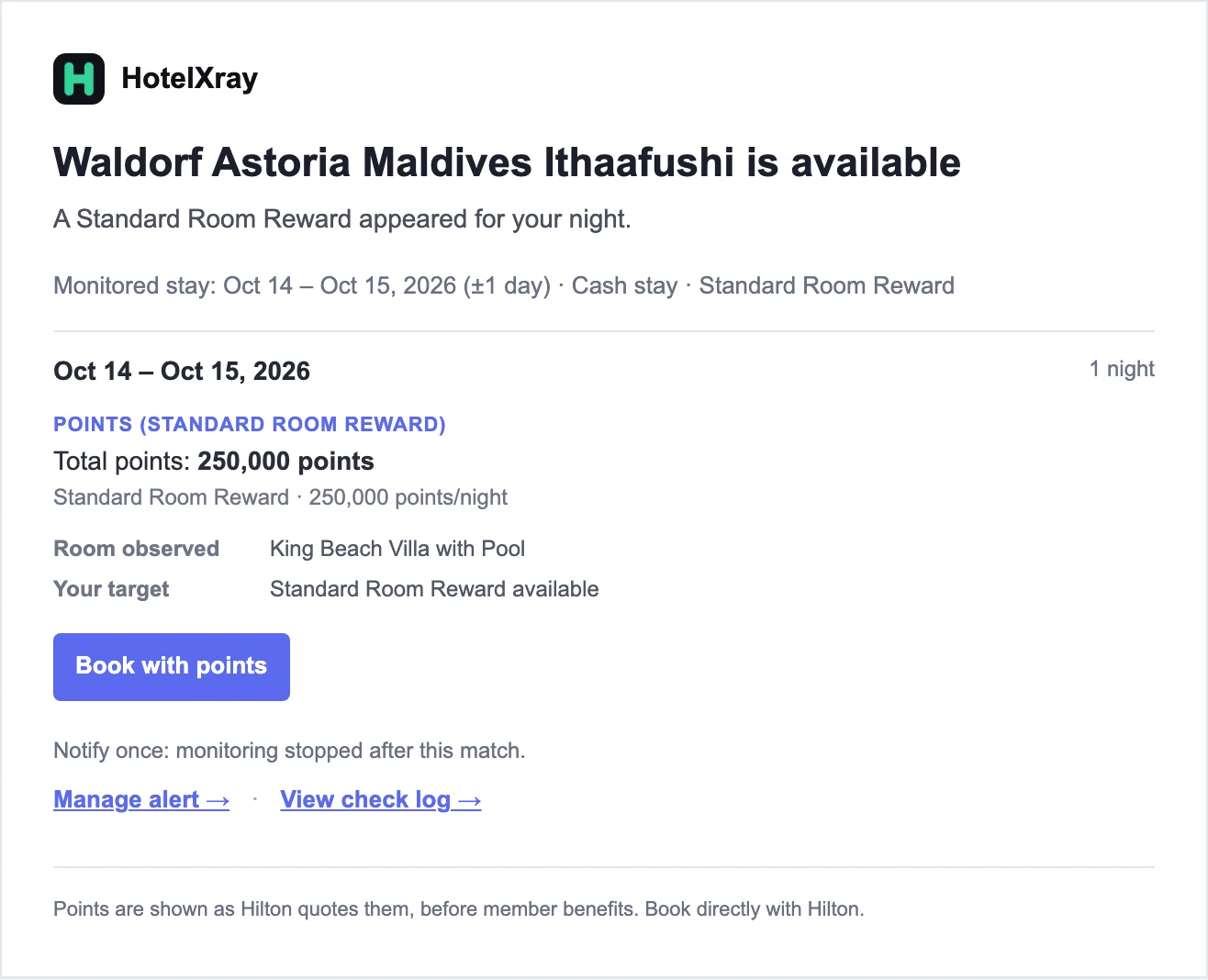
The result is labeled Points (Standard Room Reward) and shows the points found, the room observed, and your target. Cash did not meet its limit, so it is not reported. Choose Book with points to open the matched stay on hilton.com. Use Manage alert to change what you watch or View check log to see the latest checks.
Use it with an Aspire Free Night Reward
The Hilton Honors American Express Aspire Card comes with an annual Free Night Reward. Hilton’s Free Night Reward terms say it “can be redeemed for one standard accommodation, double occupancy, subject to availability at properties in the Hilton portfolio”, excluding a short list of hotels. The reward covers the room’s resort fees and taxes for that night.
That wording is why this alert has no points limit. A 250,000-point standard villa in the Maldives costs the same one certificate as a 30,000-point airport hotel. The constraint is availability, and at the properties where a free night is worth the most, standard awards are the ones that disappear.
Set the alert for the night you want with Standard Room Reward checked and no limit. When the email arrives, book that night on hilton.com with the Free Night Reward instead of points.
Keep watching after a match
Notify once alerts move to Notified, as this one did. Every change alerts remain Active, useful when you have booked a flexible rate and want to catch another drop, or when you want to hear every time a standard award returns. An alert moves to Dates passed when no watched candidate dates remain bookable; a flexible alert can continue past its original start date while a later candidate remains.
Review, edit, or delete alerts in the side panel or on your Alerts page. Each alert watches one room for two adults at one hotel. Set separate alerts to compare your shortlist over the same dates.
For Hilton calendars, the Reward Type and Cancellation filters, and the rest of the update, read HotelXray: Compare Hilton Rates, Room Rewards and Lounges at a Glance.
See more when you search Hyatt, Marriott or Hilton
Compare cash and points across the month, check lounge details, and create rate or award alerts.
Add HotelXray to Chrome