
HotelXray Blog
HotelXray: Compare Hilton Rates, Room Rewards and Lounges at a Glance
HotelXray adds Hilton alongside Hyatt and Marriott. Compare cash rates, Honors points, Standard and Premium Room Rewards, lounges and alerts in one side panel.
Last updated
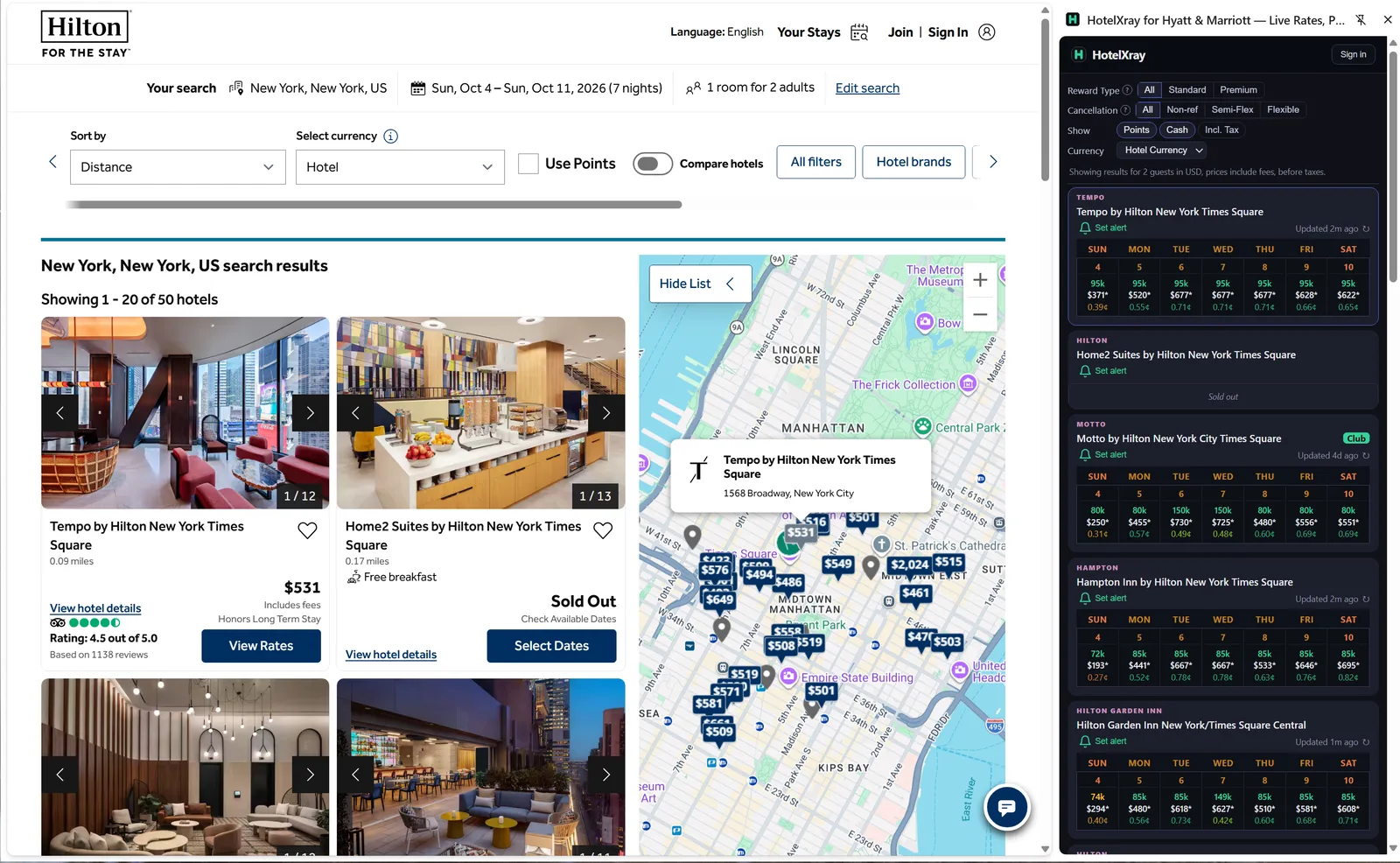
HotelXray now supports Hilton alongside Hyatt and Marriott. The same Chrome extension brings cash rates, Hilton Honors points, club lounge details, and alerts to hilton.com. Existing users can enable Hilton access in the latest version and use HotelXray on all three websites.
For Hilton Honors members, that means comparing dates, hotels, reward types, and cancellation terms in one side panel while browsing Hilton’s website.
Compare an entire month
On a Hilton hotel page, HotelXray brings cash rates, points prices, and cents-per-point values together in a monthly calendar. Stronger redemption values are shaded green, so dates worth a closer look stand out as results load.
Explore exact or flexible dates, then check the rooms and rates for the stay you want. A cheaper Standard Room Reward on another date may make moving your trip worthwhile; a low cash rate may make saving your points the better choice.
Refresh rates whenever you need a fresh check. On-demand refreshes are free, with no quotas or credits to manage.
Compare hotels from the search page
HotelXray also works alongside Hilton search results. Each hotel in the panel shows a week of points, cash, and redemption values, so you can compare the hotels you’re considering without opening every listing. Sold-out dates are labeled instead of left blank.
The Club badge marks hotels with researched lounges, so you can spot them while you compare prices and locations.
Find resorts for your Amex Aspire credit
If you’re choosing a stay to use your Hilton Honors American Express Aspire Card’s resort credit, look for the Aspire Resort Credit badge beside the hotel name. HotelXray shows it in search results and on the hotel detail page, so you can spot participating resorts while comparing cash rates and points availability.
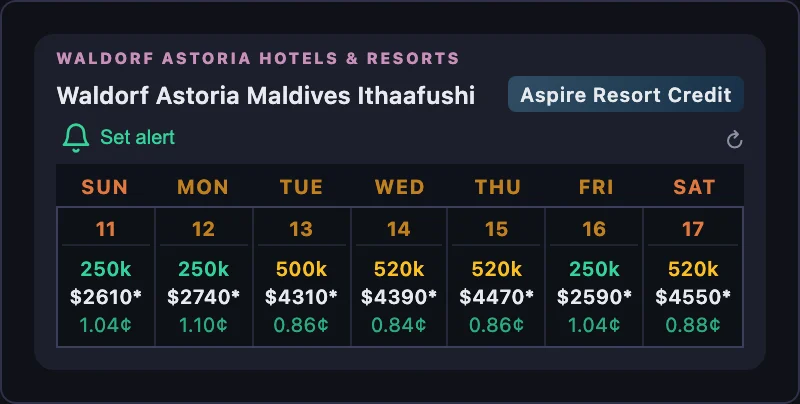
Use the calendar to find a date within your budget, or set a Hilton cash-rate alert for a resort you want to visit. The badge draws on Hilton’s eligible-resort list; check that your chosen rate and charges meet your card’s resort-credit terms before booking.
Filter by reward type and cancellation policy
Hilton sells two kinds of award: a Standard Room Reward for the hotel’s base rooms, and a Premium Room Reward for better rooms at a higher points price. The Reward Type filter switches the panel between All, Standard, and Premium, so a calendar or search list can show only the award family you would actually book.
The Cancellation filter narrows cash rates to Non-ref, Semi-Flex, or Flexible terms. Comparing a flexible rate against a non-refundable one is rarely useful, so pick the policy you want first and let the calendar show that price.
Show points and cash together or on their own, include taxes where Hilton provides them, and choose your preferred cash display currency.
Explore rooms and rates
Open a date to see rooms grouped by Standard and Premium Room Rewards. Each room lists its cash rates with Honors and public prices and the cancellation terms attached to each. CPP pairs a room’s points price with that same room’s cash rate under the same policy, so a Premium Room Reward is judged against the room it actually buys, not the cheapest room in the hotel.
Research club lounges before choosing a hotel
Compare the breakfast, evening food, and everyday convenience an executive lounge adds to your stay. HotelXray’s free lounge reports cover:
- Location and opening hours
- Breakfast, including service outside the lounge
- Evening food and drinks, with extra charges called out
- Service days, guest restrictions, and known closures
Diamond members and guests in executive rooms often have access, but the hours and what is served vary widely by property. Reading the report next to the rate comparison shows whether the lounge is worth choosing one hotel over another. The Hilton executive lounge guide explains Honors lounge access, executive rooms and how to judge whether access is worth the room premium.
Set rate and award alerts
When your preferred rate or award isn’t available, set an alert from a hotel result or calendar date. HotelXray keeps checking after you close the browser.
Watch exact or flexible dates, set a cash limit, and choose a Standard Room Reward, a Premium Room Reward, or both, each with its own points target. An any-day alert can look for a single available night within a range. Continuous monitoring keeps watching after the first match, so you can hear about another price drop or newly available award.
Every alert includes an Alert check log showing when each check ran, the cash and points values found, and which results matched. Match emails include the stay, the qualifying rate or Room Reward, and direct booking links.
Follow one example from setup to booking in Catch a Hilton Standard Room Reward: Alerts That Show Every Check.
Get started
Existing users can update HotelXray to the latest version and enable Hilton access in the side panel. New users can install HotelXray, then choose Hyatt, Marriott, Hilton, or any combination before browsing the supported websites.
Comparing rates, exploring rooms, and reading lounge details are free, with no HotelXray account required. Your email address is enough to save alerts and receive notifications. HotelXray never asks for your Hilton password or Hilton Honors credentials.
See more when you search Hyatt, Marriott or Hilton
Compare cash and points across the month, check lounge details, and create rate or award alerts.
Add HotelXray to Chrome